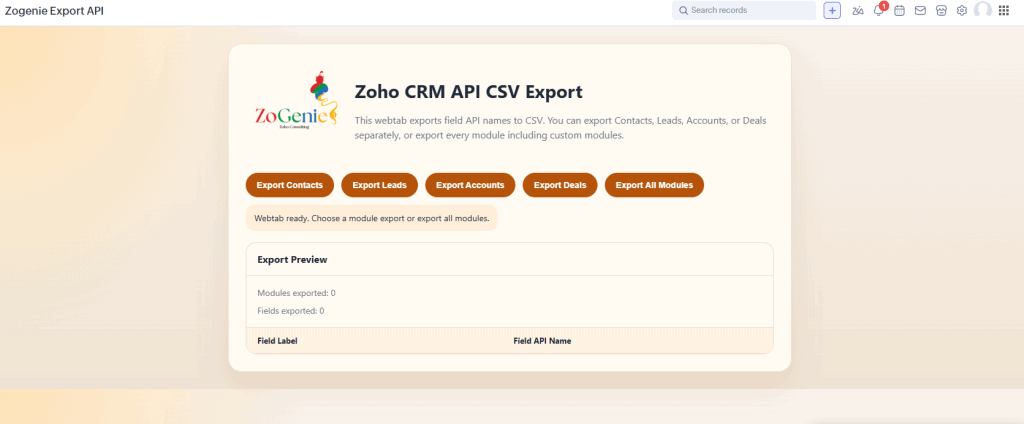
If you have ever spent three hours debugging a Zoho function only to realize that the field you thought was named Lead_Source was actually LeadSource1, you know the unique frustration of zoho deluge scripting. It is a pain. The Zogenie widget cuts out that guesswork by exporting the exact API names from your CRM. It slows down your development, blows up your custom zoho workflows, and forces you to bounce back and forth between the script editor and the "API Names" settings page.
At ZoGenie, we’re all about removing friction. We believe that your time is better spent building high-level zoho crm automation strategies rather than playing "guess the underscore." That’s exactly why I built the Zogenie widget: a simple, lightweight widget that grabs every single API name in your CRM and hands it to you in a neat CSV file.
Why API Names Are the Secret to Better Automation
In the world of Zoho, the "Display Name" (what you see on the screen) is rarely what the code needs. The API name is the internal identifier. Over time, as your CRM grows, these names become inconsistent. You might have fields created by different admins, fields installed by third-party extensions, or system fields that follow legacy naming conventions.
When you are writing zoho deluge scripting, a single character mismatch stops the entire process. This isn't just an inconvenience; it’s a bottleneck for your business. If your automation fails, your data doesn't sync, your team misses notifications, and your customers get a sub-par experience.
The AI Revolution in Deluge Coding
Let’s be honest: most of us are using AI like ChatGPT or Claude to help draft our Deluge code these days. It’s faster, and it’s great at handling logic. However, AI has one major flaw: it doesn't have a direct window into your specific Zoho environment.
When you ask an AI to "Write a script to update the 'Total Discount' field in my Deals module," the AI will guess the API name. It might suggest Total_Discount, but in your CRM, that field might actually be Discount_Amount_Total. You copy-paste the code, it fails, and you spend the next twenty minutes telling the AI why it was wrong.
The Zogenie widget changes that entire dynamic. By downloading your CRM schema as a CSV, you can provide that file directly to your AI of choice. You simply tell the AI: "Here is a list of all my CRM field API names. Use these exact names for the script I’m about to ask you to write."
Suddenly, the AI generates code that is 99% error-free on the first try. You are no longer debugging; you are just implementing.

Introducing the ZoGenie API Name Exporter Widget
We wanted to build something that required zero training. The Zogenie widget lives right where you need it. No complex configuration, no OAuth playground nonsense: just a straightforward tool for developers and CRM admins who want to get things done.
The widget maps out your entire CRM structure, including:
- Standard Modules (Leads, Accounts, Contacts, Deals)
- Custom Modules
- System Fields
- Custom Fields (the ones that usually cause the most trouble)
The Benefits of Having Your API Names in a CSV
- Reduced Script Errors: No more typos. You can copy and paste the exact string from your CSV into your Zoho function.
- Faster AI Prompting: As mentioned, giving AI the "context" of your field names makes it significantly more accurate.
- Documentation: Keep a record of your CRM’s structure for your internal documentation or for when you bring on a new developer.
- Bulk Mapping: If you are migrating data or setting up integrations via Zoho Flow or Zapier, having a reference list is a lifesaver.

Walkthrough: How to Use It (It’s One Step)
I’m not a fan of long manuals. If a tool is well-designed, it should be intuitive. Here is the complete "User Guide" for the Zogenie widget:
Step 1: Press the Download Button.
That is it. When you open the widget interface, you will see buttons to download your field data. You can choose to download the API names for a specific module or grab everything at once. Once you click, a CSV file is generated and downloaded to your computer instantly.
No waiting, no processing screens, just your data in a format you can actually use.
Real-World Use Case: Streamlining Custom Zoho Workflows
Let’s look at a practical example of how this speeds up zoho crm automation. Imagine you want to create a workflow that calculates a custom commission based on three different fields in the "Deals" module and then updates a field in the "Sales Commissions" custom module.
In the old way, you would:
- Go to Settings -> API Names -> Deals. Find the three field names.
- Go to Settings -> API Names -> Sales Commissions. Find the target field name.
- Write the Deluge script, likely making a typo in one of the long custom field names (like
Commission_Rate_2024_Revised). - Test, fail, find the error, fix it, and save.
With the Zogenie widget:
- Open the widget and click "Download CSV."
- Upload that CSV to ChatGPT.
- Prompt: "Based on the attached CSV, write a Deluge script for the Deals module that takes
Field_AandField_B, multiplies them, and updatesField_Cin the Sales_Commissions module." - Copy, paste, and watch it work.
You’ve just turned a 15-minute task into a 2-minute task. When you multiply that across dozens of custom zoho workflows, you’re saving hours of high-level engineering time every week.

Why Efficiency Matters for Your Business
In the consulting world, we see a lot of companies struggling with "technical debt." Their CRM is a mess because previous automations were built poorly or half-finished because the developer got frustrated with the technical hurdles.
By using tools that simplify the "boring" parts of coding: like finding API names: you free up your brain to focus on the business logic. Does this automation actually help our sales team? Does it improve our conversion rate? Those are the questions you should be answering, not "Is there an underscore after 'Lead'?"
At ZoGenie, we focus on our projects being clean, scalable, and easy to maintain. The Zogenie widget is a small piece of that philosophy. Whether you are a solo admin or managing a massive enterprise instance, having your field data at your fingertips is a game-changer.
Get More Out of Your Zoho CRM Automation
If you are serious about scaling your operations, you need to move past manual data entry and "hacky" scripts. Professional zoho crm automation requires precision.
The Zogenie widget is just the beginning. If you’re looking to truly transform how your business uses software, check out our blog for more tips on zoho deluge scripting or reach out to us on our contact page. We love helping businesses take their Zoho function library from "functional" to "flawless."
Summary of Key Features:
- Instant CSV Export: Get all API names in seconds.
- AI-Ready Data: Feed your CRM schema to LLMs for perfect code.
- Zero Configuration: Install and click.
- Cross-Module Support: Works with standard and custom modules.
Stop guessing. Start building. Your Deluge scripts: and your sanity: will thank you.
If you want to see how we’ve helped other businesses streamline their workspace, take a look at our testimonials. We’ve spent years mastering the quirks of the Zoho ecosystem so you don’t have to.
Ready to make your zoho crm automation smarter? It starts with knowing your API names. Download the Zogenie widget, hit the button, and get back to work.