
ZOGENIE INSIGHTS
How to Use ChatGPT to Write Zoho Deluge Scripting: A Practical Guide

Writing Zoho Deluge scripting does not have to be difficult. Whether you are trying to automate a simple field update or build a complex multi-module integration, the syntax is unique to the Zoho ecosystem. If you’ve tried asking ChatGPT to write code for you, you’ve likely run into a frustrating wall: it hallucinates field names, mixes up Zoho CRM syntax with Zoho Creator syntax, or uses outdated API versions.
The problem isn’t ChatGPT; it’s the lack of context. Deluge isn’t as widely documented in public training sets as Python or JavaScript. To get high-quality Zoho code, you have to give ChatGPT the right data and prompts.
This guide shows you the exact framework we use at ZoGenie to turn ChatGPT into a high-speed Deluge developer.
The Problem: Why ChatGPT Fails at Deluge
Standard LLMs often struggle with Deluge because it is less widely represented in training data and its syntax can resemble JavaScript. It also does not know your Zoho setup and API names can be different than variable names.
There are 2 things I do to overcome these issues:
1. I add a document I created that compiled a lot of deluge code and all the syntax so it is more accurate. Think of it as training ChatGPT on real good Deluge code with documentation and high level explanation of the language.
2. Add the variable and API names to the AI. This takes the guess work out of if it will select the correct api name.
Step 1: Extract Your API’S
- Log into your Zoho CRM (or relevant Zoho app).
- Navigate to Settings (the gear icon in the top right).
- Under the Developer Space section, click on APIs and SDKs.
- Look for the API Names tab. In the top left.
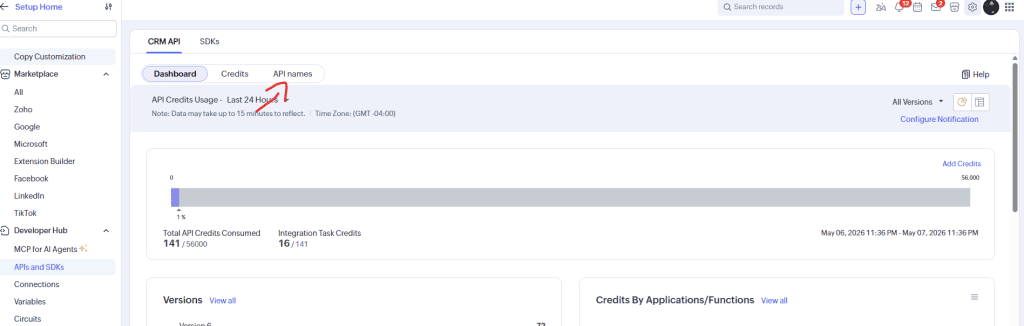
This lists every module (Leads, Accounts, Deals, Custom Modules) and every field within them.
Pro Tip: Don’t just look at one module. If your automation moves data from “Contacts” to an “Deals,” you need the API names for both.
Step 2: Feed the “Context” to ChatGPT
Once you are in the API Names section, select the module you are working on. You will see a list of every field and its corresponding API name.
Do not manually type these out.
- Drag and copy the whole list.
- Open a fresh ChatGPT session (GPT-5 or higher is recommended for better logic).
- Paste the data and use the following prompt:
“I am working on a Zoho Deluge script for my Zoho CRM environment. Below is a list of the API names. Please acknowledge that you have received these and use these specific names for any code you generate. Do not use generic placeholders.”
By doing this, you eliminate 90% of the common errors associated with zoho development services. ChatGPT now knows that “Phone Number” is actually Phone_1 and “Status” is Lead_Status.
Step 3: Define the Logic (The Scripting Phase)
Now that ChatGPT has your blueprints, you can ask for the Zoho function. Be direct. Tell it what triggers the script and what the desired outcome is.
Bad Prompt: “Write a script to update a deal when it’s closed.”
Good Prompt: “Using the API names I provided, write a Deluge script to be used in a CRM Workflow. When a Deal is updated to ‘Closed Won’, I want the script to:
- Fetch the related Account.
- Update the ‘Customer_Status’ field in the Account module to ‘Active’.
- Create a new record in the Custom_Projects module with the Deal Name as the Project Title.”
By providing the “Order of Operations,” you ensure the logic is sound.
Step 4: Issues to Watch Out For
1. One specific issue with zoho deluge scripting is the way variables are handled. As noted in industry research, ChatGPT often defaults to the input.variable syntax used in Creator. In CRM, this results in a “Variable not defined” error.
If you see this, give ChatGPT a quick correction:
“You used input.accountID, but this is for a CRM function. Please use the variable name directly as it is passed in the function arguments.”
In most functions for automations you will be passing in the id from the arguments anyways so you can usually remove this line and just use the variable name as the id for the argument.
2. If you see a while loop automatically remind ChatGPT there are no while loops in Deluge. Say there are only for each loops and redo the code.
Refining Your Code
Telling ChatGPT to add debugging is how you can communicate whether the code is working or not. Tell it to add debugging so that you can see where issues are taking place.
When you run the code copy the result and paste it back to Chat.
Best Practices for ChatGPT Deluge Coding
To get the most out of this process, keep these rules in mind:
- Specify the App: Always tell ChatGPT if you are in CRM, Books, Creator, or Inventory.
- Version Control: Always save the code somewhere else when it is working so you can go back. Deluge does have version control so you can use that as well but make sure you remember which version is working.
- Limit the Scope: Don’t ask for a 500-line script at once. Ask for it in stages when you can. The smaller the code the more accurate.
When ChatGPT Isn’t Enough
While ChatGPT is a powerful tool for accelerating zoho development services, it has limits. It cannot see your architectural technical debt, and it doesn’t understand the long-term implications of how certain automations might trigger “recursion” (scripts triggering other scripts in an infinite loop).
If you find yourself spending more time debugging ChatGPT’s code than actually running your business, it might be time for a professional review. At ZoGenie, we specialize in taking these foundational automations and hardening them for enterprise-level reliability.
Check out our projects to see how we’ve implemented complex logic that goes far beyond simple API calls, or browse our blog for more technical deep dives.
Final Thoughts
Using ChatGPT for zoho deluge scripting is game changing and with these tips it is that much better.
If you hit a wall or need a custom integration that requires more than just a quick script, contact the experts at ZoGenie. We help businesses bridge the gap between “standard software” and “optimized engines.”